
Airfoil Aerodynamics Tutorial - NACA Airfoil
This tutorial serves as a foundational CFD test case for external aerodynamics

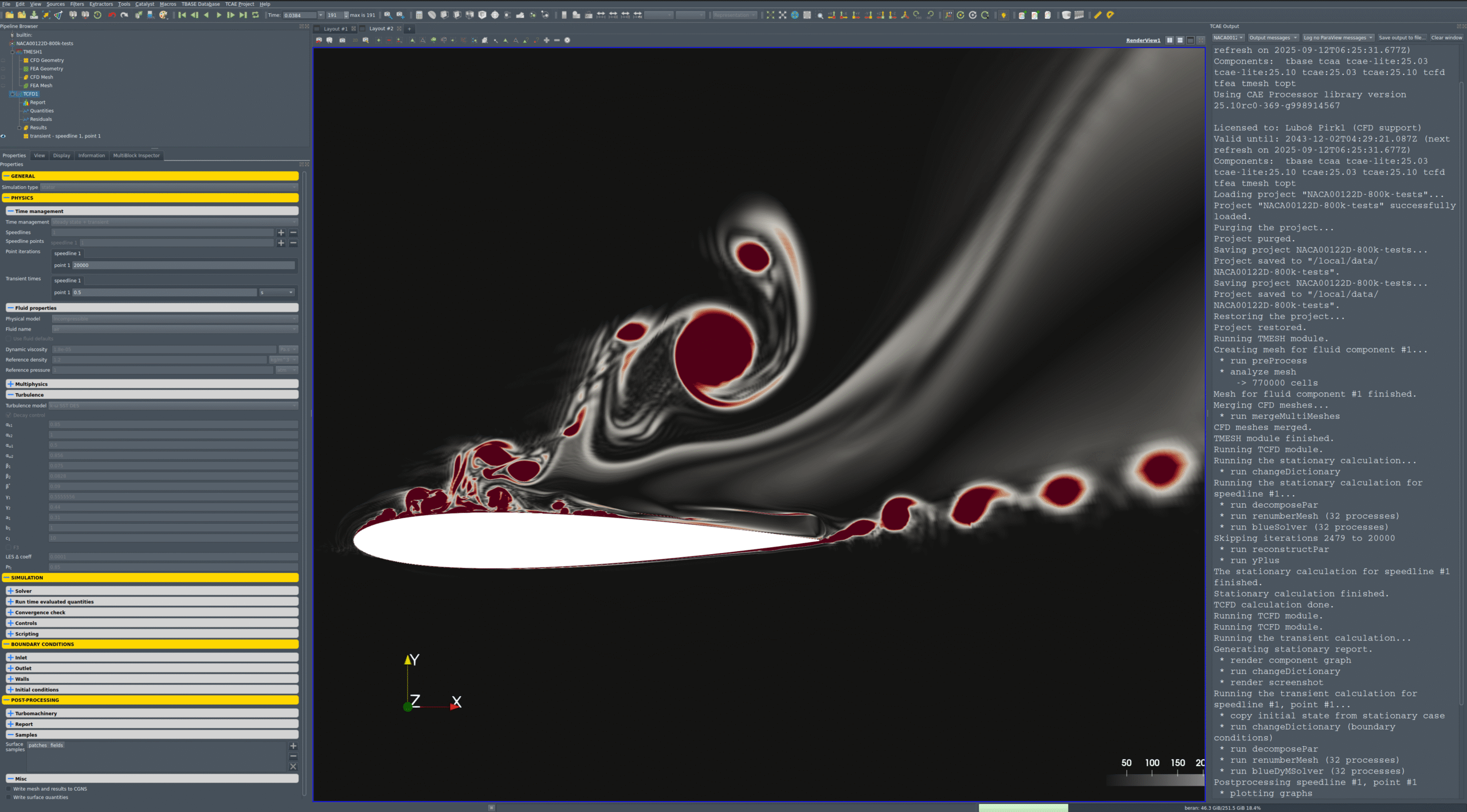
NACA 0012 Turbulence RANS, URANS, DES, and LES
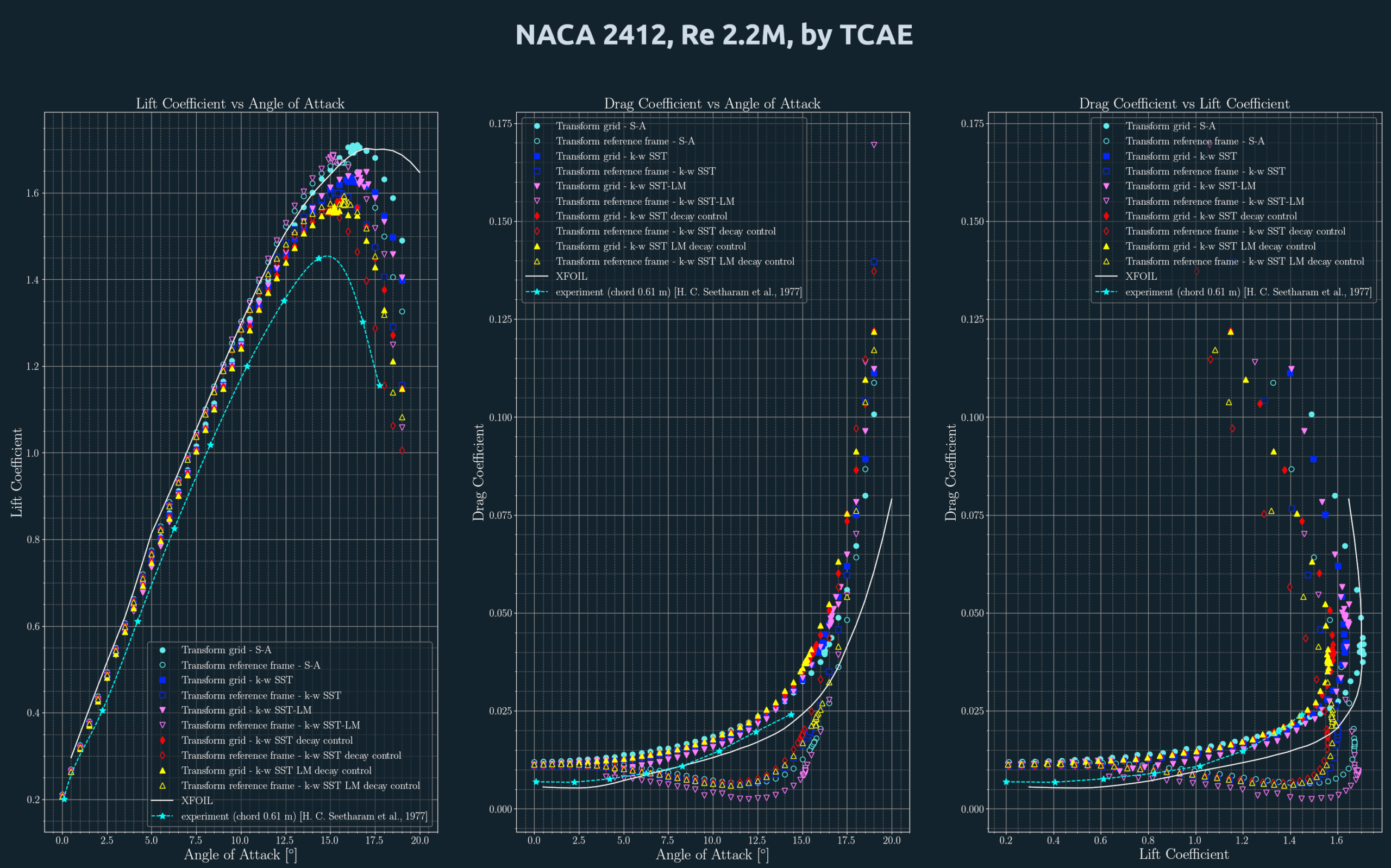
NACA 2412 Lift & Drag
About NACA Airfoil
An airfoil profile NACA is a type of airfoil shape that was developed by the National Advisory Committee for Aeronautics (NACA), a precursor of NASA, in the 1920s and 1930s. NACA airfoils are characterized by a series of digits that describe their geometric properties, such as camber, thickness, and position of maximum camber. NACA airfoils are widely used in various aircraft designs, such as wings, propellers, and turbines.
One of the most common NACA airfoil profiles is the NACA 2412, which has a maximum camber of 2% located at 40% of the chord length from the leading edge, and a maximum thickness of 12% of the chord length. The chord is the straight line joining the leading and trailing edges of the airfoil. The camber is the curvature of the airfoil from the chord line. The thickness is the distance between the upper and lower surfaces of the airfoil.
The shape of a NACA airfoil profile can be calculated using mathematical equations that plot the camber line and the thickness distribution perpendicular to the camber line. The equations are different for symmetrical and asymmetrical airfoils, and for different regions of the airfoil. The equations can be found in various sources, such as Wikipedia
https://en.wikipedia.org/wiki/NACA_airfoil
or online calculator:
https://nasa.fandom.com/wiki/NACA_airfoil
NACA airfoil profiles have been extensively tested and analyzed for their aerodynamic performance, such as lift, drag, and stall characteristics. NACA airfoils are known for their simplicity, versatility, and reliability in various flight conditions. However, they also have some limitations, such as susceptibility to cavitation and shock waves at high speeds. Therefore, newer airfoil profiles have been developed to overcome these challenges, such as supercritical and transonic airfoils.
I hope this information helps you learn more about NACA airfoil profiles. If you want to see some examples of NACA airfoils, you can use my graphic art tool to generate some images for you. Just type #graphic_art(“NACA xxxx”) where xxxx is the four-digit code of the airfoil you want to see. For example, #graphic_art(“NACA 0012”).
This tutorial is a lab for the TCAE simulation environment. TCAE is a powerful tool that allows you to simulate and analyze fluid flows using numerical methods. With its user-friendly interface and cost-effective pricing, TCAE is a great choice for engineers, researchers, and students who are interested in studying aerodynamics.
In this tutorial, we will cover the basics of TCAE, the user interface, and how to set up a basic CFD simulation. Whether you are a beginner or an experienced user, this tutorial will provide you with the foundation you need to start using TCAE to model and analyze the aerodynamics of moving trains. So, let’s get started!
This NACA 0012 tutorial is 2D (two-dimensional). The mesh is exclusively hexahedral (in fact, quadrilateral) and is created in the external tool construct2D.
There are many mesh sizes tested. The most popular are 120k, 400k, and 800k cell meshes.
NACA 0012 2D TestCase Setup
- TCAE version: TCAE_25.10
- Modules: TMESH, TCFD
- Simulation points: 1
- Case type: Airfoil (NACA 0012), incompressible, steady with transient stepping
- Turbulence model: kOmegaSSTDES
- Freestream: U = (60, 30, 0) m/s → speed ≈ 67.1 m/s, AoA ≈ 26.6°
- Compute resources: TCFD MPI = 32
| Fluid | Air |
| Model | Incompressible |
| Density | 1.2 kg/m³ |
| Dynamic viscosity | 1.8e‑05 Pa·s |
| Reference pressure | 1 atm |
Gravity: Off (g = 0; settings include g = 9.81 but TCFD-gravity = no)
Derived freestream:
| Vector | (60, 30, 0) m/s |
| Speed | ≈ 67.1 m/s |
| Angle of attack | ≈ 26.6° |
- Airfoil: noSlip (low-Re walls)
- Inlet: freestream — U = (60, 30, 0) m/s; p = 0 Pa; k = 1.8; ω = 100 s⁻¹
- Outlet: freestream — U = (60, 30, 0) m/s; p = 0 Pa; k = 1.8; ω = 100 s⁻¹
- Patches: airfoil, inlet, outlet, frontEmpty, backEmpty
- Empty patches: frontEmpty, backEmpty
- Time management: stationaryWithTransient
- Temporal controls: adaptive time step; transient window = 0.01 s; transient time = 0.5 s
- Max outer iterations: 20,000
- Discretization order: second
- PIMPLE: nOuterCorrectors = 30, nCorrectors = 2
- Relaxation: U = 0.7, p = 0.2
- Convergence (examples): U_relTol = 0.01, p_relTol = 0.001
- Computed fields: Q-criterion, turbulence intensity, vorticity (wall shear stress = off)
- Geometry source: volumetric mesh (imported)
- Mesh output: CFD
- Components: 1 (Co1)
- Reference frames: 2 defined (both non‑rotating in this setup)
- Scale: 1 m
- Geometry source: volumetric mesh (imported)
- Mesh output: CFD
- Components: 1 (Co1)
- Reference frames: 2 defined (both non‑rotating in this setup)
- Scale: 1 m
Download TCAE Tutorial - Airfoil NACA 0012
File name: NACA-0012-airfoil-TCAE-Tutorial.zip
File size: 6 MB
Tutorial Features: CFD, TCAE, TMESH, TCFD, SIMULATION, INCOMPRESSIBLE FLOW, RANS-URANS-DES, AUTOMATION, WORKFLOW, EXTERNAL MESH, 1 COMPONENT