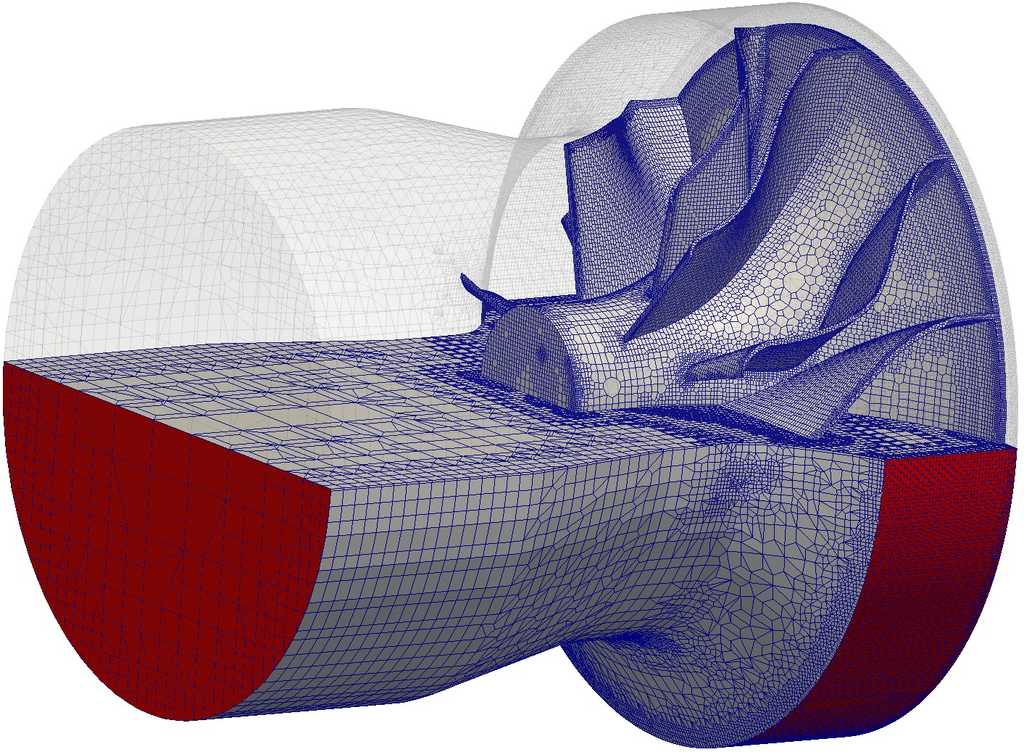





Utility snappyHexMesh refines background mesh in direction to the surface model, reading set-up from system/snappyHexMeshDict:
castellatedMesh true;
snap            true;
addLayers       false;


// Geometry. Definition of all surfaces. All surfaces are of class
// searchableSurface.
// Surfaces are used
// - to specify refinement for any mesh cell intersecting it
// - to specify refinement for any mesh cell inside/outside/near
// - to 'snap' the mesh boundary to the surface
geometry
{
    c-housing.stl
    {
        type        triSurfaceMesh;
        name        rotor_inner_wall;
    }

    c-wheel.stl
    {
        type        triSurfaceMesh;
        name        rotor_wheel;
    }

    c-interface.stl
    {
        type        triSurfaceMesh;
        name        interface;
    }
};


// Settings for the castellatedMesh generation.
castellatedMeshControls
{

    // Refinement parameters
    // ~~~~~~~~~~~~~~~~~~~~~

    // If local number of cells is >= maxLocalCells on any processor
    // switches from from refinement followed by balancing
    // (current method) to (weighted) balancing before refinement.
    maxLocalCells 120000000;

    // Overall cell limit (approximately). Refinement will stop immediately
    // upon reaching this number so a refinement level might not complete.
    // Note that this is the number of cells before removing the part which
    // is not 'visible' from the keepPoint. The final number of cells might
    // actually be a lot less.
    maxGlobalCells 150000000;

    // The surface refinement loop might spend lots of iterations refining just a
    // few cells. This setting will cause refinement to stop if <= minimumRefine // are selected for refinement. Note: it will at least do one iteration // (unless the number of cells to refine is 0) minRefinementCells 0; // Allow a certain level of imbalance during refining // (since balancing is quite expensive) // Expressed as fraction of perfect balance (= overall number of cells / // nProcs). 0=balance always. maxLoadUnbalance 0.10; // Number of buffer layers between different levels. // 1 means normal 2:1 refinement restriction, larger means slower // refinement. nCellsBetweenLevels 3; // Explicit feature edge refinement // ~~~~~~~~~~~~~~~~~~~~~~~~~~~~~~~~ // Specifies a level for any cell intersected by its edges. // This is a featureEdgeMesh, read from constant/triSurface for now. features ( { file "c-housing_c-interface_intersection.eMesh"; level 5; } { file "c-wheel.eMesh"; level 5; } ); // Surface based refinement // ~~~~~~~~~~~~~~~~~~~~~~~~ // Specifies two levels for every surface. The first is the minimum level, // every cell intersecting a surface gets refined up to the minimum level. // The second level is the maximum level. Cells that 'see' multiple // intersections where the intersections make an // angle > resolveFeatureAngle get refined up to the maximum level.

    refinementSurfaces
    {
        rotor_inner_wall
        {
            level       (2 4);
        }

        rotor_wheel
        {
            level       (2 4);
        }

        interface
        {
            level       (4 4);
        }

        rotor_back_wall
        {
            level       (2 4);
        }
    }

    // Resolve sharp angles
    resolveFeatureAngle 30;


    // Region-wise refinement
    // ~~~~~~~~~~~~~~~~~~~~~~

    // Specifies refinement level for cells in relation to a surface. One of
    // three modes
    // - distance. 'levels' specifies per distance to the surface the
    //   wanted refinement level. The distances need to be specified in
    //   descending order.
    // - inside. 'levels' is only one entry and only the level is used. All
    //   cells inside the surface get refined up to the level. The surface
    //   needs to be closed for this to be possible.
    // - outside. Same but cells outside.

    refinementRegions
    {
    }


    // Mesh selection
    // ~~~~~~~~~~~~~~

    // After refinement patches get added for all refinementSurfaces and
    // all cells intersecting the surfaces get put into these patches. The
    // section reachable from the locationInMesh is kept.
    // NOTE: This point should never be on a face, always inside a cell, even
    // after refinement.
    locationInMesh (0. 0. 210.);


    // Whether any faceZones (as specified in the refinementSurfaces)
    // are only on the boundary of corresponding cellZones or also allow
    // free-standing zone faces. Not used if there are no faceZones.
    allowFreeStandingZoneFaces true;
}
Create the mesh running snappyHexMesh utility: snappyHexMesh
In order to reduce bandwidth and speed up computation on the generated rotor mesh, it is convenient to use renumberMesh utility using following command: renumberMesh -latestTime
When finished, check the mesh running checkMesh and view the mesh in paraview: checkMesh paraFoam